
This feature is a great tool in our Marketing Suite that provides a customised way to communicate important updates, promotions, and announcements to your audience.
NOTE: Twilio SMS fees apply based on your usage, and are paid through your Twilio account.
In this article:
- Learn about Twilio. Log in or Sign Up for an account here
- Link Twilio to INTIX
- Audience Segments
- Send SMS
Link Twilio to INTIX
Login to INTIX:
AU - intix.com.au
NZ - intix.co.nz
UK - intix.co.uk
US - intix.com
1. Go to Organisation > Developers > Third Party Integrations > Add Integration
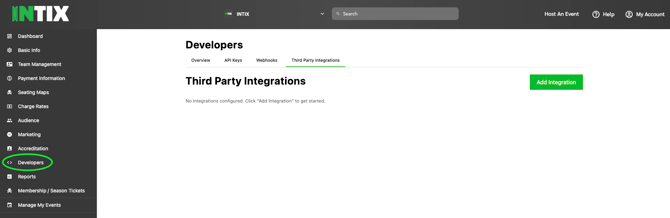
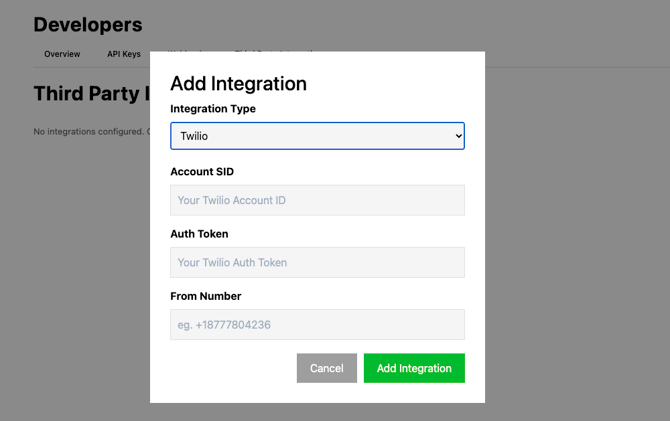
2. Select Twilio from the dropdown
3. Enter your Twillio Account ID
4. Enter your Twilio Auth Token
5. Enter From Number (the number the SMS will appear to send from).
Audience Segments:
First, you’ll need to create your Audience Segment. As with Email Campaigns and Push Notifications, you can select specific segment of your audience to target with an SMS message.
From your entire audience, you can apply filters to isolate customers meeting particular conditions, ie. ticket holders to a particular event, or past members only.
Read more about creating and managing your Audience Segments lists.
Send Your SMS:
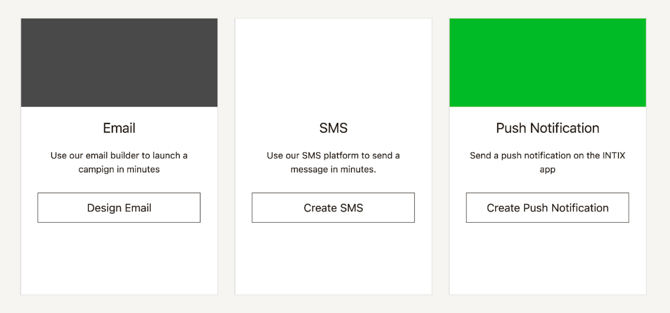
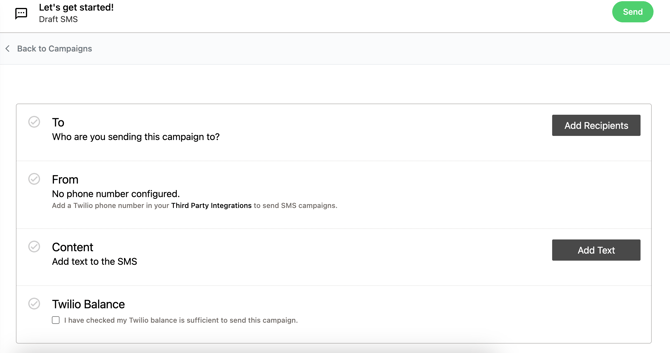
1. Go to Organisation > Marketing > Campaigns > Create SMS
2. Create your message and send it to your selected audience segment quickly and efficiently.
Stripe account must be active before an SMS can be sent.
If you have not yet connected your Stripe account, heres how: Connecting Stripe for access to your funds
Related:
- Creating and Managing Audience Segments
- How to create an Email Marketing Campaign (eDM)
- How to create and send Push Notifications
- Add Tracking Pixels to your INTIX pages and events
- Add Google Analytics tracking to your events
- Affiliate Marketing: What it is and how to use it
Questions? Email your Account Executive or help@intix.com.