
What is a third-party integration?
Third-party integration is the attachment of an application programming interface (API) from one application to another.
In other words, if you want our platform and another platform you use to share information with one another automatically - we can build that for you!
Our tech team will need to liaise with the other company's developers to do some configuration around this.
This is a custom feature - please contact your INTIX Account Executive or our tech team at help@intix.com to discuss your particular integration needs.
Scenario: Drip integration with INTIX
Drip is an email marketing company (similar to Mailchimp). An INTIX client using our platform for membership and ticket sales wanted to push information from our platform to Drip automatically after every ticket sale.
This way the customer information is in their main email database on Drip, and the client can reach them with mail-outs.
Add a third-party integration to your organisation:
- Log in to your INTIX Account
AU - intix.com.au
NZ - intix.co.nz
UK - intix.co.uk
US - intix.com
> Organisation Settings - Developer Tools
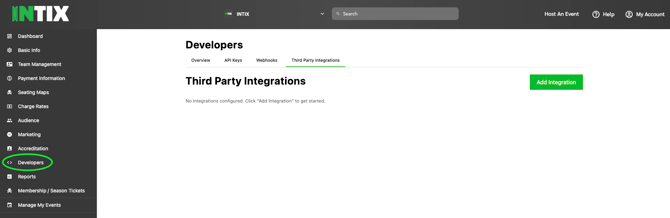
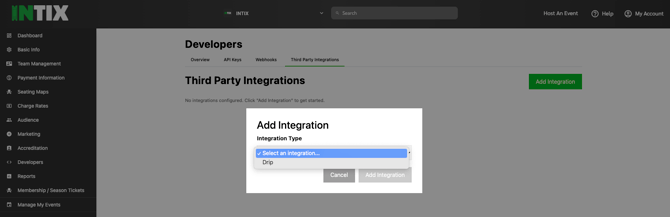
- Third-Party Integrations > Add third party integration by selecting from the integration from the drop-down list.
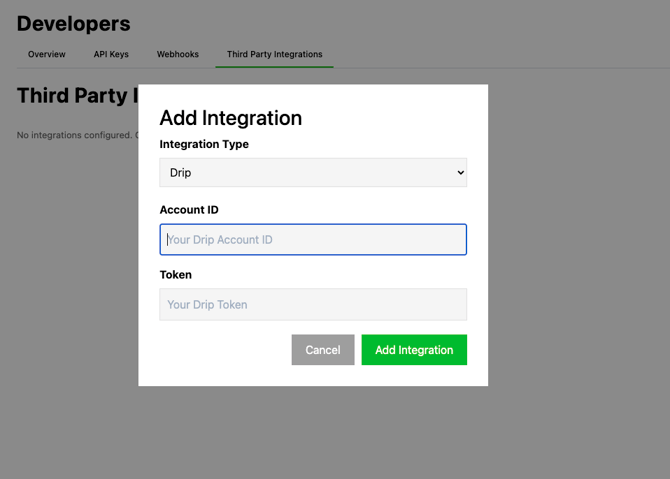
You will need to provide the required information from your account with the other company (in this case, Account Number and Token):
Questions? Reach out to our tech team at help@intix.com