
NOTE: This must be decided when building the event, as it cannot be changed once the event has been published 'Live' and tickets are on sale.
Log in to your INTIX Account
AU - intix.com.au
NZ - intix.co.nz
UK - intix.co.uk
US - intix.com
Go to Host An Event > select Event > Payments & Tax > Payment Options
The default setting is pass on ticket fee (INTIX) and absorb transaction fee (Stripe)
-
Green toggle = fees absorbed
-
White toggle = fees passed to the customer
You can choose to pass on or absorb the ticket fee. This decision can be changed per event - (while in draft mode).
Example of fee:
- Passing on ticket fees (default)
if your ticket price is $10
+ the INTIX fee is $0.99*
- the *Stripe transaction fee (1.70% + 0.30) = $0.49 (not displayed at check out)
= the customer pays $10.99
= the event organiser receives $9.51
- Absorbing ticket fees (this fee will come out of the ticket price)
if your ticket is $10
- the INTIX fee $0.99*
- the *Stripe transaction fee (1.70% + 0.30) = $0.49
= the event organiser, receives $8.52
*INTIX fee is based on your contracted rates, viewed via your Organisation > Charge Rates
*Stripe fees are standard and based on the transaction total, not per ticket, so will vary depending on how many tickets are in the customer's cart at checkout and are absorbed by the event organiser.
View the Fees
To see the effect these changes have on what the customer pays, you can enable and disable ticket fee absorption in draft mode, and check it from the front end on the ticketing page:
- Dashboard > click on Your Event URL
- Select ticket(s) > see the cart on the right hand side with fee total
- Go to Check out and see the break down of fees
- Service Fee is the INTIX Ticket Fee
-OR-
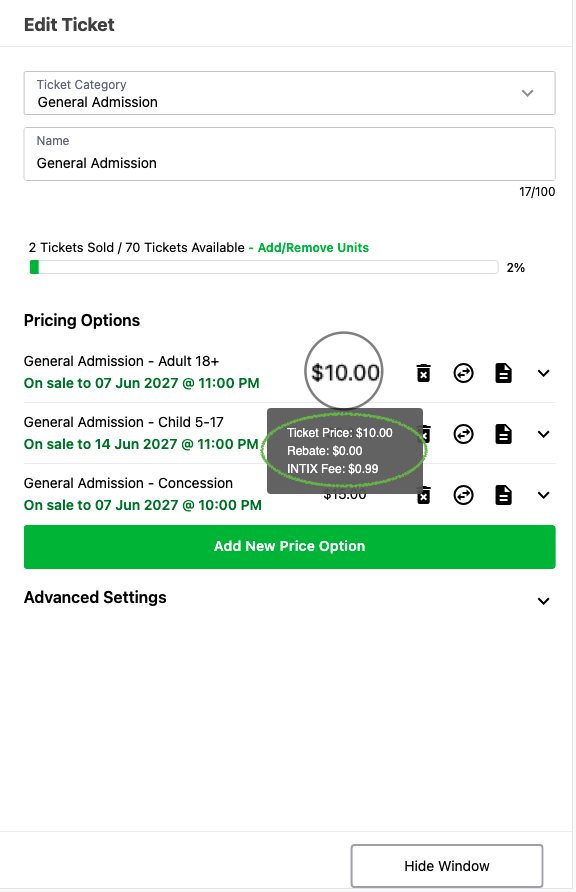
Hover over the ticket price within Tickets and view the total
- Tickets, select the three dots on the right of the Ticket Type, select Edit
- Hover over the Price Option total
- You will see the Ticket fee
Pricing and fees by region
INTIX operates across several markets, and fee structures can vary depending on the event, organiser and local requirements.
Australia: Event organisers are responsible for determining how applicable ticketing and service costs are incorporated into their pricing. Since 1 October 2026, transaction fees for Visa, Mastercard, American Express and eftpos payments will no longer be permitted under the relevant card-network rules. Card processing costs may instead be incorporated into the overall price of the ticket or service. Other types of fees, such as booking or service fees, are not automatically prohibited by these changes and remain subject to applicable pricing and consumer-law requirements.
United Kingdom: Mandatory fees must generally be included in the total price presented to customers upfront. This includes mandatory per-transaction charges that a customer must pay to complete their purchase.
United States: For live-event tickets, businesses must generally disclose the total price upfront, including mandatory fees that are known and can be calculated at the time the price is displayed. Certain charges, such as taxes, government charges, shipping and optional services, may be treated differently under the applicable rules.
New Zealand: Ticket sellers and event organisers must provide clear and accurate information about ticket prices, fees and the terms of sale. Customers should be able to understand the total cost and any applicable fees before completing their purchase.
Because requirements can vary by market and event, the fees displayed during checkout are the most accurate representation of the amount payable for a particular ticket purchase.
Related article:
Understanding Fees and Charge Rates
Questions? Email your Account Executive or help@intix.com