
Log in to your INTIX Account
AU - intix.com.au
NZ - intix.co.nz
UK - intix.co.uk
US - intix.com
> Host An Event
Tickets page
-
Ticket Categories > Create Ticket Category
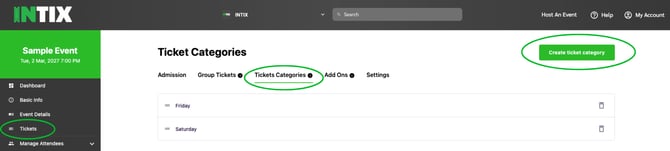
-
Enter Title of Category > Save
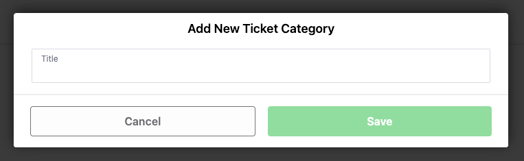
NOTE: To edit the title - unattach from the ticket type then delete the ticket category title, create new category.
Tickets page
-
Click on a ticket > select Edit, using the dropdown attach Ticket to Category
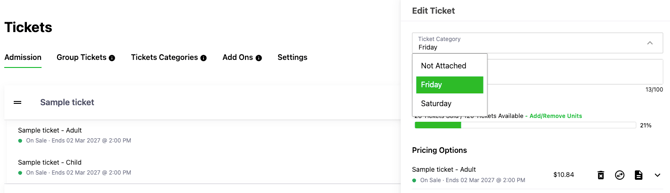
-
Assign all Ticket Types to Ticket Categories. Unassigned ticket types will display under the last Ticket Category in order.
- Change sequence of ticket categories on the page by dragging and dropping categories into preferred order.
- Group Tickets are automatically assigned to the Ticket Category that the tickets are drawn from.
- You can only assign the group ticket to the category from whose capacity it draws.
- You cannot assign the group ticket to a different category than from the capacity it draws from.
-
Show Categories: Tickets > Admission tab, enable the toggle 'Show Categories' to view which Ticket Categories are assigned to each Ticket type for cross-checking.
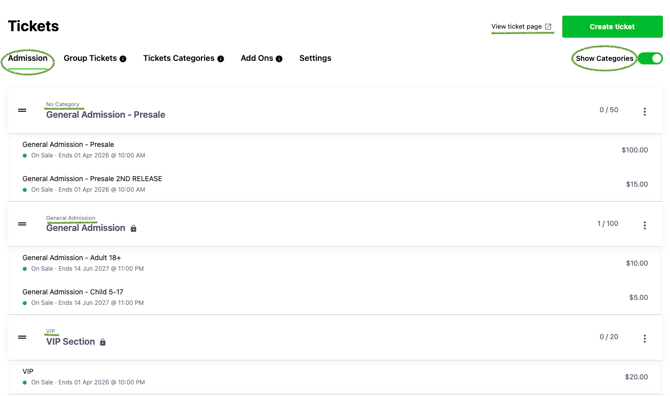
Dashboard
- Check your work! From the event Dashboard, Your Links, click the 'Your Ticketing URL' link to view the customer view of the event ticketing page.
Questions? Email your Account Executive or help@intix.com