
First name and surname is collected during checkout by default for each member. All custom question information is captured in the Members > Member Listing, select Export.
Note: Date of Birth, Gender, Email, Mobile, Company, Address and Referred By is collected via Pricing Options. Refer to this article: How to create a Membership Pricing Option
Login to INTIX:
AU - intix.com.au
NZ - intix.co.nz
UK - intix.co.uk
US - intix.com
1. Go to Organisation Settings > select your Org > Membership Season Tickets > Additional Settings > Custom Question
2. Select + Add Question
3. Filling in the details:
-
select from dropdown Collect Information From - Buyer or Each Attendee
- Question Format - Short text or Dropdown
- enter Question Prompt ie. T-shirt Size
- Enter Question Placeholder ie. select from dropdown
- Optional Settings: Show this question for specific ticket types
- SAVE
- Edit via the three-dots on the right.
You can toggle Include Question on or off, set as Required or not.
Note: If you select 'Show this question for specific ticket types' you must select the membership type otherwise the question will not show at checkout. If left unticked, the question will appear for all membership types.
Custom Question information is captured in the Members > Member Listing, select Export, all answers will be included, making it easy to filter, sort, and prepare the information. Use the settings cog to include other information required, then close and export.
Add a dropdown Custom Question for a specific membership type:
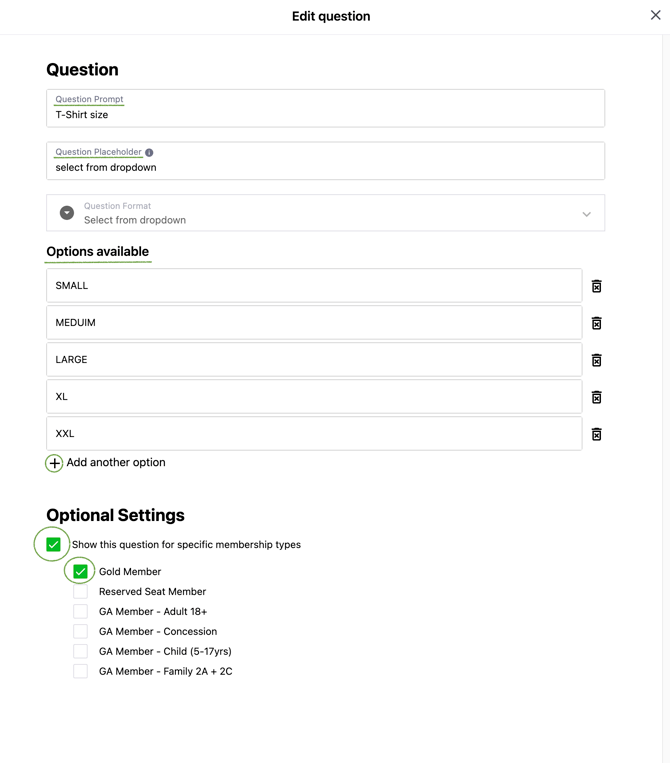
View how it looks at the membership check out page
Go to Membership/Season Tickets > Dashboard > select View Site

Note: if your membership site is currently 'offline' log in via My Account as a Super Admin

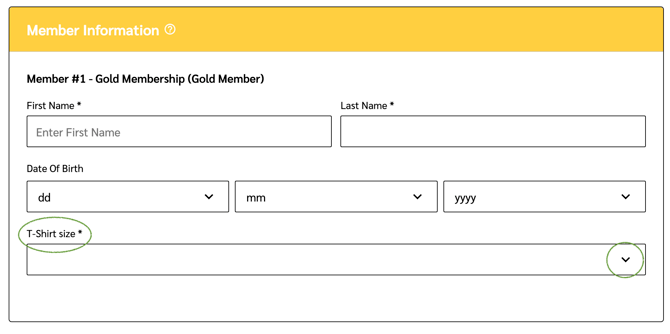
Customer view of Custom Question at the checkout page:
Note: all Custom Questions appear under Member Information, ensuring accurate details are collected for each member.
All custom question information is captured in the Members > Member Listing, select Export.
Questions? Email your Account Executive or help@intix.com