
In this article:
-
Cancel and Refund entire order excluding fees
- Cancel and Refund including fees
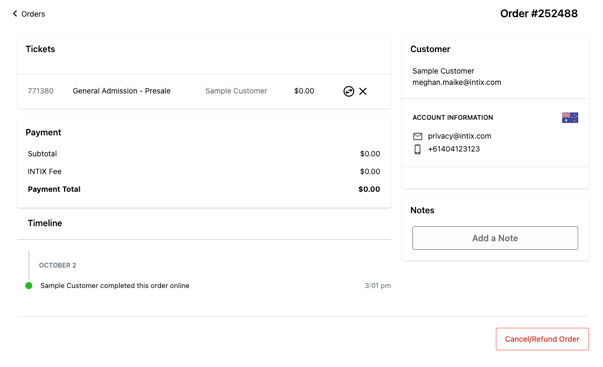
Cancel and Refund entire order excluding fees
- Login to INTIX:
AU - intix.com.au
NZ - intix.co.nz
UK - intix.co.uk
US - intix.com
> Host An Event - Manage Attendees > Orders
- Enter the email address or surname of order.
- Click the "Cancel/Refund" button at the bottom right of the order
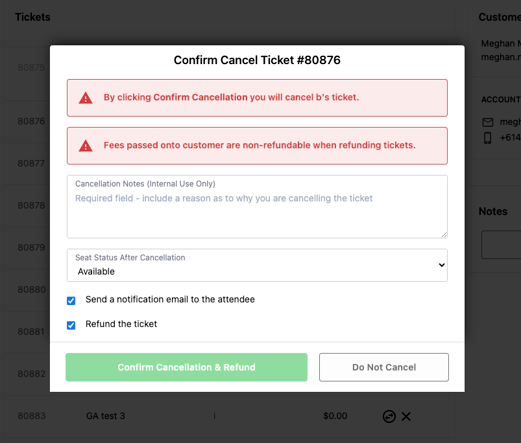
- Reason for canceling - in the pop-up window, fill in the reason (minimum of 10 characters)
- Select seat status after cancelling to available, on hold or unavailable
- Notify customer - select/deselect whether you want to notify the customer, and/or refund the order
- Fees - note that this refunds the customer the ticket price(s), but not the Stripe fee or the INTIX fee. These are non-refundable*.
NOTE: Once you cancel an order you cannot undo this action. If you have accidentally cancelled an order you can reissue complimentary tickets. Check out the article here.
Cancel and refund including fees
Note: This comes out of your own payouts, as Stripe & INTIX fees are non-refundable.
How to process a full refund in Stripe
-
Log in to stripe.com/au, then from the Dashboard:
- Find the payment on the Payments page by entering the last Four digits of their card used - in the search bar enter last4:####
- Click the ⋯ icon to the right of the payment and select Refund payment (or click the payment and select Refund from the top right).
- Enter the refund amount (it defaults to the full amount; adjust for partial refunds).
- Select a reason for the refund.
- Click Refund.
Depending on the customers bank’s processing times, they should receive their refund within 3–5 business days
Note:
If you wish to process a ticket from an order, you can cancel the tickets individually.
Questions? Email your Account Executive or help@intix.com